YouTube Embed Errors Explained: How to Fix Error 153, 150, 101 and "Video Unavailable"
You paste an embed code, refresh the page, and instead of a video you get a grey box and an error. It's frustrating, mostly because the message rarely tells you what to do next.
The good news is that every YouTube embed error falls into one of two groups. Either something is wrong with your code or page (which you can fix), or the video owner has set it up so it can't play on your site (which you can't). This guide helps you work out which one you're dealing with in under a minute.
First, a 30-second test
Before you change anything, open this address in a new tab, swapping in your video ID:
https://www.youtube.com/embed/VIDEO_ID- If it plays there but not on your site, the problem is your page, your code or your settings. Keep reading.
- If it fails there too, the problem is the video. Skip to the section on restrictions.
Not sure what the video ID is? Paste the link into our Video ID Finder and it will give you the ID and a clean embed link.
Error 153: "Video player configuration error"
This is the newest error and the one that confuses people most, because the video works fine everywhere else.
Error 153 usually means YouTube can't tell which website the player is on. YouTube now expects embeds to send an HTTP Referer header so it knows where the video is playing. If your page strips that header, the player refuses to load.
Common causes:
- A
referrerpolicy="no-referrer"attribute on the iframe. - A site-wide
Referrer-Policy: no-referrerheader set by a security plugin, CDN or server config. - A mobile app showing the embed in a WebView without a proper base URL.
How to fix it:
- Remove
referrerpolicy="no-referrer"from the iframe, or change it tostrict-origin-when-cross-origin(the same value YouTube's own embed code uses). - Check your security headers. If you use a plugin like a "hardening" or "headers" plugin, look for Referrer-Policy and set it to
strict-origin-when-cross-origin. - In an Android or iOS WebView, load the HTML with a real base URL (your domain) rather than
about:blankor a local file.
Embed codes made with our Embed Code Generator already include the right referrer policy, so regenerating your code is often the fastest fix.
Error 150 and Error 101: embedding disabled
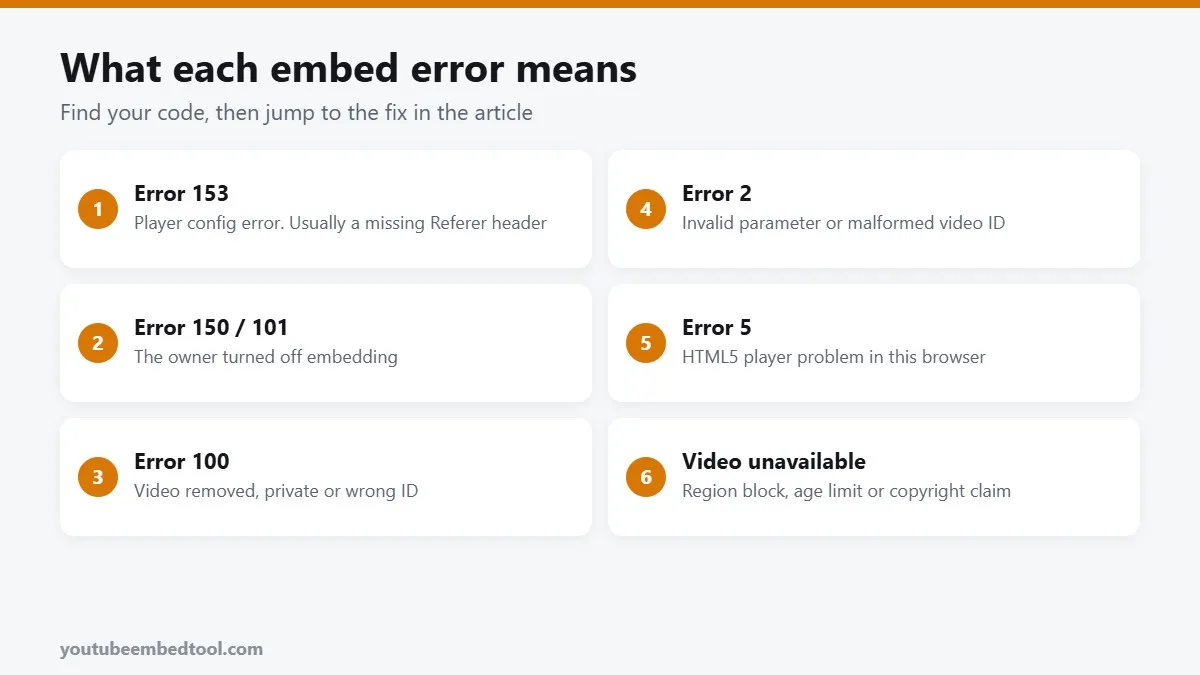
These two mean the same thing: the video owner has switched off embedding. You'll usually see the message "Playback on other websites has been disabled by the video owner" or "Video unavailable. Watch on YouTube".
There's no parameter or trick that gets around this, and you shouldn't try. Your options are:
- Ask the creator to allow embedding (it's a single checkbox in YouTube Studio under the video's details).
- Find another upload of the same content from an official source that allows embedding.
- Link to the video instead, using a thumbnail as the clickable image. Grab a sharp one with our Thumbnail Downloader.
If it's your own video, go to YouTube Studio, open the video, click Show more, and tick Allow embedding.
Error 100: video not found
The video has been deleted, made private, or the ID in your code is wrong. Check for typos first. YouTube IDs are exactly 11 characters and are case sensitive, so abc and ABC are different videos.
If the video was set to private, an "unlisted" video will still embed, but a private one never will.
Error 2: invalid parameter
Something in your embed URL doesn't make sense to the player. The usual suspects:
- A second
?in the URL. Only the first parameter uses?; the rest use&. - An ID copied with extra junk, like
VIDEO_ID&t=30spasted where only the ID should go. - A
startorendvalue written as1:30instead of seconds (90).
Our embed parameter cheat sheet shows the correct format for every option.
Error 5: HTML5 player error
This one is about the browser rather than the video. It often shows up with aggressive ad blockers, very old browsers, or browser extensions that interfere with video. Try a private window with extensions off. If it plays there, an extension is the culprit.
"Video unavailable" with no code
When there's no number, the video is usually blocked for that viewer specifically:
- Region restrictions. The owner or a rights holder has blocked certain countries.
- Age restrictions. Age-restricted videos can't play in embeds; viewers must sign in on YouTube.
- Copyright claims. Some claimed videos play on YouTube but not on other sites.
- Made for kids. These embed, but some features like the miniplayer and comments are off.
You can't fix these from your end. The kindest thing for your readers is to add a short line under the video, such as "If the video doesn't load, watch it on YouTube", with a direct link.
The embed loads but shows a black box
If there's no error but nothing appears, check these:
- Lazy loading scripts that never swap the placeholder for the real iframe.
- Cookie consent tools that block YouTube until the visitor accepts. That's often correct behaviour; using
youtube-nocookie.comcan help, as we explain in youtube-nocookie and GDPR. - A zero height container. Responsive wrappers sometimes collapse. Our guide to responsive YouTube embeds has CSS that works.
Quick troubleshooting order
- Test the plain
/embed/VIDEO_IDURL in a new tab. - If it fails there, it's the video: restrictions, privacy or embedding is off.
- If it works there, check your referrer policy (Error 153).
- Check the URL for a stray
?or wrong time format (Error 2). - Try a private window with extensions disabled (Error 5).
Nine times out of ten, one of those five steps finds the problem. And if your issue is that the video won't start on its own, that's a different story covered in YouTube autoplay not working.
Frequently asked questions
What does YouTube Error 153 mean?
It is a player configuration error. It usually means the page is not sending a Referer header, often because of referrerpolicy no-referrer on the iframe or a site-wide security header.
How do I fix "Playback on other websites has been disabled by the video owner"?
You can't from your side. The owner has turned off embedding. Ask them to enable it, use another official upload, or link to the video with a thumbnail.
Why does my embedded YouTube video say video unavailable?
The video may be private, deleted, age restricted, region blocked or under a copyright claim that blocks playback on other sites.
Can unlisted YouTube videos be embedded?
Yes. Unlisted videos embed normally. Private videos cannot be embedded.