How to Embed YouTube Videos in React and Next.js (Fast and Responsive)
Dropping a YouTube video into a React app looks easy until you hit the details: the iframe won't stay 16:9 on mobile, JSX complains about allowfullscreen, and Lighthouse tells you the embed is adding a megabyte of JavaScript to your page.
Here are four approaches, from the simplest to the most powerful, with code you can paste in today.
1. A plain responsive iframe component
For most sites this is all you need. No packages, works in any React setup.
export default function YouTubeVideo({ id, title }) {
  return (
    <div style={{ aspectRatio: '16 / 9', width: '100%' }}>
      <iframe
        src={`https://www.youtube-nocookie.com/embed/${id}`}
        title={title}
        width="100%"
        height="100%"
        style={{ border: 0 }}
        allow="accelerometer; autoplay; clipboard-write; encrypted-media; gyroscope; picture-in-picture; web-share"
        referrerPolicy="strict-origin-when-cross-origin"
        allowFullScreen
        loading="lazy"
      />
    </div>
  );
}
Use it like this:
<YouTubeVideo id="VIDEO_ID" title="How our app works in 2 minutes" />A few things worth pointing out:
- JSX uses camelCase. It's
allowFullScreenandreferrerPolicy, not the HTML spelling. Get these wrong and React warns you in the console, and the full-screen button may not work. - Keep
referrerPolicy. If it's missing or set tono-referrer, YouTube can refuse to play with Error 153. Our guide to YouTube embed errors explains why. aspectRatiokeeps it 16:9 on any screen width. It's supported in every modern browser. The older padding trick is covered in how to make a YouTube embed responsive.loading="lazy"stops the iframe loading until it's near the screen.
Need the ID from a full link? The Video ID Finder handles every format, or write a small helper that reads the v search parameter from the URL.
2. Next.js: the official YouTubeEmbed component
Next.js ships a YouTube component in its @next/third-parties package. Under the hood it uses a lightweight facade, so the heavy YouTube player only loads when someone interacts with it.
Install it:
npm install @next/third-parties@latestThen use it in any page or component:
import { YouTubeEmbed } from '@next/third-parties/google';

export default function Page() {
  return <YouTubeEmbed videoid="VIDEO_ID" height={400} params="controls=1&rel=0" />;
}
The params prop accepts the same parameters as a normal embed URL. Our embed parameter cheat sheet lists them all. If you're on Next.js, this is the option we'd reach for first.
3. Any React app: a lite facade for speed
A standard YouTube iframe loads a lot of JavaScript before anyone presses play. On a page with several videos, that adds up fast. We look at the impact in do YouTube embeds slow down your site.
A facade fixes this. It shows the thumbnail and a play button, and only loads the real player on click. In React, the popular package is react-lite-youtube-embed:
npm install react-lite-youtube-embedimport LiteYouTubeEmbed from 'react-lite-youtube-embed';
import 'react-lite-youtube-embed/dist/LiteYouTubeEmbed.css';
export default function Demo() {
return <LiteYouTubeEmbed id="VIDEO_ID" title="Product demo" />;
}To the visitor it looks and feels almost the same. To Lighthouse, it's a huge improvement.
4. Controlling the player: react-youtube
If you need to react to what the video is doing, like tracking when someone finishes it, pausing it when a modal closes, or jumping to a timestamp from a button, you need YouTube's IFrame API. The react-youtube package wraps it nicely:
npm install react-youtubeimport YouTube from 'react-youtube';
export default function Lesson() {
const opts = { width: '100%', playerVars: { rel: 0, playsinline: 1 } };
return (
<YouTube
videoId="VIDEO_ID"
opts={opts}
onReady={(e) => e.target.seekTo(90)}
onEnd={() => console.log('Video finished')}
/>
);
}playerVars takes the same parameters as an embed URL. The event.target object gives you methods like playVideo(), pauseVideo() and seekTo(seconds).
Common gotchas
Autoplay doesn't work. Browsers only allow autoplay when the video is muted. Add mute=1 along with autoplay=1. Full details in YouTube autoplay not working.
Hydration warnings in Next.js. If you build the embed URL from something that differs between server and client (like window.location), you'll get a mismatch. Build the URL from props only.
The video reloads on every render. If the src string changes even slightly between renders (say, a new timestamp each time), React replaces the iframe. Keep the URL stable, or memoise it.
Content Security Policy blocks it. If your app has a CSP, add https://www.youtube-nocookie.com and https://www.youtube.com to frame-src.
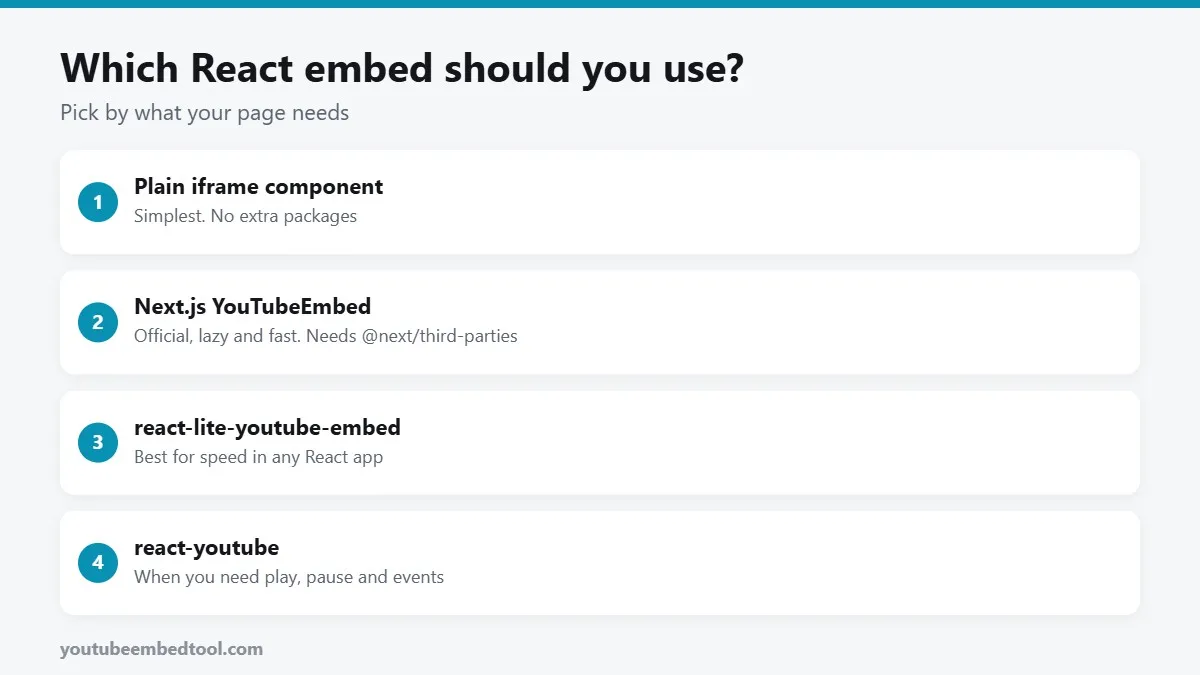
Which one should you use?
- Simple blog or landing page: the plain iframe component.
- Next.js:
YouTubeEmbedfrom@next/third-parties. - Performance matters and you're not on Next.js:
react-lite-youtube-embed. - You need events and control:
react-youtube.
And if you just want to grab an embed code quickly for a CMS page or a static site, our YouTube Embed Code Generator builds it with all the right attributes already in place.
Frequently asked questions
How do I embed a YouTube video in React?
Render an iframe with src set to https://www.youtube-nocookie.com/embed/VIDEO_ID, use allowFullScreen and referrerPolicy in camelCase, and wrap it in a container with aspect-ratio 16 / 9.
Does Next.js have a YouTube component?
Yes. The @next/third-parties package includes a YouTubeEmbed component that loads a lightweight facade and accepts the video ID and embed parameters.
How do I stop YouTube embeds slowing down my React app?
Use a facade such as react-lite-youtube-embed, which shows a thumbnail and loads the real player only when the visitor clicks play.
How do I control a YouTube video from React code?
Use the react-youtube package. It wraps the YouTube IFrame API and gives you methods like playVideo, pauseVideo and seekTo, plus events like onEnd.