YouTube RPM vs CPM: What They Mean and Which One Pays You
Open the Revenue tab in YouTube Studio and you'll see two numbers that look like they measure the same thing: CPM and RPM. They don't, and mixing them up is the most common reason creators overestimate what their channel will earn.
Here's the short version. CPM is what advertisers pay. RPM is what you get. The rest of this guide explains why they're different and how to use RPM to estimate your real income.
What is CPM?
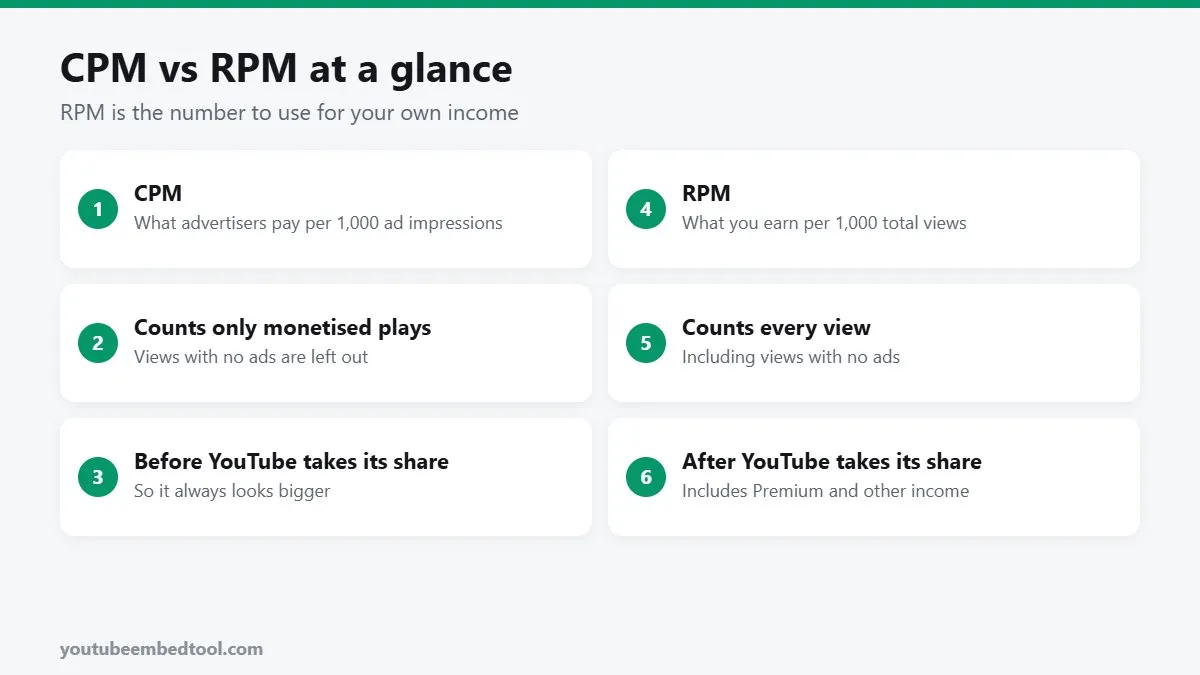
CPM stands for cost per mille, meaning cost per thousand. On YouTube it's the average amount advertisers pay for every 1,000 ad impressions on your videos.
Two things make CPM look bigger than your actual earnings:
- It's measured before YouTube takes its share. It's the full price the advertiser paid.
- It only counts views where an ad was shown. Many views don't show an ad at all, because the viewer has YouTube Premium, uses an ad blocker, or just wasn't served one.
CPM is useful for one thing: understanding how valuable your audience is to advertisers. A finance channel might see a high CPM because advertisers compete for that audience. A gaming channel aimed at young viewers will usually see a lower one.
What is RPM?
RPM stands for revenue per mille. It's how much you earn for every 1,000 views of your videos.
RPM is the more honest number because:
- It's after YouTube's share. For long-form ads, creators in the YouTube Partner Program get 55% and YouTube keeps 45%.
- It counts every view, including the ones with no ads.
- It includes other income such as YouTube Premium revenue, channel memberships, Super Chat and Super Thanks.
That's why RPM is almost always lower than CPM. It's not that you're being underpaid. It's that RPM spreads your real earnings across all your views.
A simple example
Say a video gets 100,000 views and the CPM is $10.
Not every view shows an ad. Let's say 50,000 of them do, and to keep the maths simple, each of those shows one ad. (In reality one playback can show more than one ad.)
- Ad revenue paid by advertisers: 50,000 ÷ 1,000 × $10 = $500
- Your 55% share: $275
- Add, say, $25 of Premium revenue: $300
- Your RPM: $300 ÷ 100,000 × 1,000 = $3.00
So the CPM was $10, but you earned $3 per 1,000 views. That gap is completely normal.
Want to try your own numbers? Our YouTube Money Calculator uses RPM so the result is closer to what lands in your account.
What's a typical RPM?
It varies a lot, and anyone giving you a single number is guessing. RPM depends on:
- Your niche. Finance, business, software and education usually earn more. Entertainment, gaming and music usually earn less.
- Where your viewers are. Viewers in the US, UK, Canada and Australia tend to bring higher rates than viewers in many other countries.
- Time of year. Advertisers spend more in Q4 (October to December) before the holidays, and less in January.
- Video length. Videos over 8 minutes can show mid-roll ads, which can lift earnings.
- Format. Shorts are paid from a separate revenue pool, and Shorts RPMs are usually much lower than long-form.
For a deeper look at real-world ranges by niche, see how much YouTube pays per 1,000 views.
Where to find your RPM and CPM
- Open YouTube Studio.
- Click Analytics, then the Revenue tab.
- You'll see RPM on the overview. Click See more for CPM and playback-based CPM.
You need to be in the YouTube Partner Program to see these numbers.
Which number should you track?
Use RPM for anything to do with your own income: planning, comparing videos, deciding which topics to make more of. It's the one that answers "how much is a view worth to me?"
Use CPM when you want to understand advertiser demand, for example, why your December numbers were great and January dropped.
How to raise your RPM
You can't set your RPM, but you can nudge it upwards:
- Make longer videos where it fits. Over 8 minutes allows mid-roll ads. Don't pad, though; viewers leave and that hurts more.
- Pick topics advertisers care about. Reviews, tutorials and buying guides often attract higher-paying ads.
- Turn on all ad formats in the monetisation settings for each video.
- Add other income streams. Memberships, Super Thanks and Premium views all count towards RPM.
- Get views from outside YouTube. Embedding your videos on your own blog or website brings new viewers. Our guide to getting more views from embedded videos explains how, and the Embed Code Generator makes the embed code.
Summary
- CPM is what advertisers pay per 1,000 ad impressions, before YouTube's share.
- RPM is what you earn per 1,000 views, after YouTube's share, from all sources.
- RPM is always lower, and that's normal.
- Use RPM to estimate your income, and the Money Calculator to try different scenarios.
Frequently asked questions
What is the difference between YouTube CPM and RPM?
CPM is what advertisers pay per 1,000 ad impressions before YouTube's share. RPM is what the creator earns per 1,000 views after YouTube's share, from all revenue sources.
Why is my YouTube RPM lower than my CPM?
RPM counts every view, including views with no ads, and is measured after YouTube keeps its share. CPM only counts monetised impressions at the full price.
How much of ad revenue does YouTube keep?
For long-form videos, creators in the YouTube Partner Program receive 55% of ad revenue and YouTube keeps 45%.
How do I calculate my YouTube earnings from RPM?
Divide your views by 1,000 and multiply by your RPM. For example, 200,000 views at a $2.50 RPM is about $500.